Cycle Removal
From MedITEX - Wiki
(Difference between revisions)
| Line 24: | Line 24: | ||
<p> </p> | <p> </p> | ||
<h3>Further details</h3> | <h3>Further details</h3> | ||
| + | <table border="0"> | ||
| + | <tbody> | ||
| + | <tr> | ||
| + | <td> | ||
| + | <p>[[Image:rem1.png|none|740px|thumb|left|link=http://wiki.meditex-software.com/images/rem1.png| ]]</p> | ||
| + | </td> | ||
| + | </tr> | ||
| + | </tbody> | ||
| + | </table> | ||
<p> </p> | <p> </p> | ||
| − | < | + | <table style="float: right;" border="0"> |
| + | <tbody> | ||
| + | <tr> | ||
| + | <td style="text-align: right;"><a href="/index.php?title=MedITEX_IVF_manual">Back to the MedITEX IVF menu</a></td> | ||
| + | <td style="text-align: right;"><a href="/index.php?title=MedITEX_IVF_manual"> </a><a href="/index.php?title=MedITEX_IVF_manual"> </a><a href="/index.php?title=Cycles">Back to the cycles</a></td> | ||
| + | <td style="text-align: right;"><a href="#top">Back to top</a></td> | ||
| + | </tr> | ||
| + | </tbody> | ||
| + | </table> | ||
Revision as of 11:54, 11 March 2013
Removal
  |
| <img src="/images/rem2.png" alt="" width="204" height="67" /> |
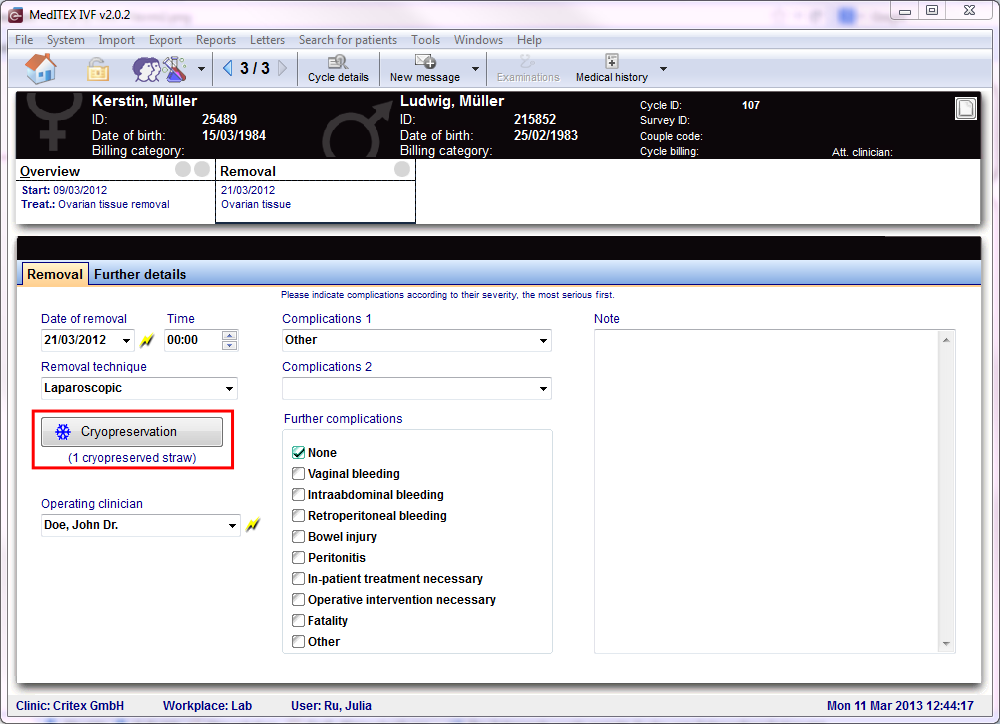
If you click the first time on this button, you can <a href="/index.php?title=Freezing_a_new_sample#Freezing_an_oocyte.2Fembryo_sample">freeze </a>the sample. At the second time you go directly to the <a href="/index.php?title=Cryo_storage">cryo storage</a>. Below the button you can see how many straws are cryopreserved. |
Further details
|
|
| <a href="/index.php?title=MedITEX_IVF_manual">Back to the MedITEX IVF menu</a> | <a href="/index.php?title=MedITEX_IVF_manual"> </a><a href="/index.php?title=MedITEX_IVF_manual"> </a><a href="/index.php?title=Cycles">Back to the cycles</a> | <a href="#top">Back to top</a> |