Statistics
From MedITEX - Wiki
(Difference between revisions)
| Line 38: | Line 38: | ||
</tr> | </tr> | ||
<tr> | <tr> | ||
| − | <td style="text-align: center;"><img src="/images/ | + | <td style="text-align: center;"><img src="/images/BE.png" alt="" width="43" height="27" /></td> |
| − | <td> | + | <td>Choose if you want to see the <strong>basis unit</strong> or the<strong> unit</strong>.<br /></td> |
</tr> | </tr> | ||
<tr> | <tr> | ||
| Line 54: | Line 54: | ||
</tr> | </tr> | ||
<tr> | <tr> | ||
| − | <td><img style="display: block; margin-left: auto; margin-right: auto;" src="/images/ | + | <td><img style="display: block; margin-left: auto; margin-right: auto;" src="/images/PlusChart.png" alt="" width="54" height="29" /></td> |
| − | <td> | + | <td>Create a new chart. It will be opend at the right side of the window. Close it with the "X".</td> |
</tr> | </tr> | ||
<tr> | <tr> | ||
| − | <td | + | <td>Parameter</td> |
| − | <td> | + | <td>Change the Parameter who is shown in the chart.</td> |
</tr> | </tr> | ||
<tr> | <tr> | ||
| − | <td | + | <td>Time period</td> |
| − | <td> | + | <td>Set a date.</td> |
</tr> | </tr> | ||
<tr> | <tr> | ||
| Line 96: | Line 96: | ||
</tbody> | </tbody> | ||
</table> | </table> | ||
| + | <table style="float: right;" border="0"> | ||
| + | <tbody> | ||
| + | <tr> | ||
| + | <td style="text-align: right;"><a href="/index.php?title=MedITEX_IVF_manual">Back to the MedITEX IVF menu </a></td> | ||
| + | <td style="text-align: right;"><a href="#top">Back to top</a></td> | ||
| + | </tr> | ||
| + | </tbody> | ||
| + | </table> | ||
| + | <p><span class="mw-headline"><br /></span></p> | ||
Revision as of 13:08, 20 December 2012
| <img src="/images/Statistics.png" alt="" width="60" height="38" /> | If the "Statistics" - button is clicked the following window will pop up: |
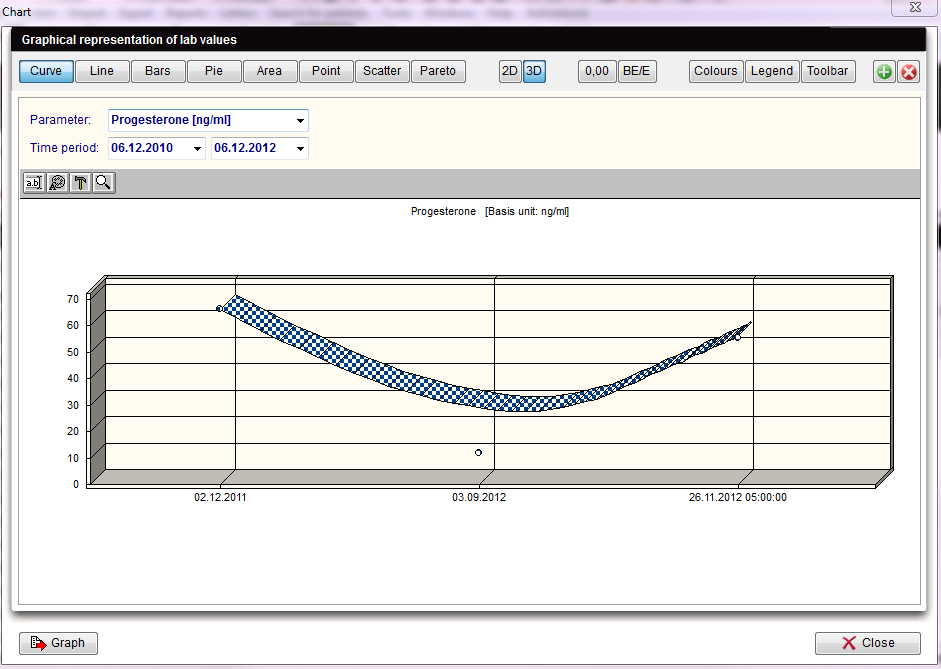  |
For the x-axis of your statistics you can use all columns of the list of results.
For the y-axis you can only use column whose associated field from the data base contains numerical values only (integers, floating-point numbers).
These are only descriptive statistics: histograms, plots and their individual parts.
The interpretation of the y-values exclusively depends on the scale measurement of the data used (the data is, however, displayed in such a way as if the values were all interval-scaled).
| Explaination of the fields/icons: | |
| Curve, Bars... Pareto | These are different layouts that can be chosen for the chart. |
| <img style="display: block; margin-left: auto; margin-right: auto;" src="/images/2D3D.png" alt="" width="59" height="28" /> | By clickng on these icon the chart will have a 2D/3D layout. |
| <img src="/images/0,00.png" alt="" /> |
By clickng on these icon can be set the decimal places. |
| <img src="/images/BE.png" alt="" width="43" height="27" /> | Choose if you want to see the basis unit or the unit. |
| <img src="/images/Colours.png" alt="" width="59" height="25" /> |
Here can be chosen the background colours of the graph and of the form. A third option allow to swap the colours between the graph and the form. |
| <img style="display: block; margin-left: auto; margin-right: auto;" src="/images/Legend.png" alt="" width="57" height="25" /> | Click on this button to show/hide the legend. |
| <img style="display: block; margin-left: auto; margin-right: auto;" src="/images/Toolbar.png" alt="" width="59" height="27" /> | Click on this button to show/hide the toolbar. |
| <img style="display: block; margin-left: auto; margin-right: auto;" src="/images/PlusChart.png" alt="" width="54" height="29" /> | Create a new chart. It will be opend at the right side of the window. Close it with the "X". |
| Parameter | Change the Parameter who is shown in the chart. |
| Time period | Set a date. |
| <img src="/images/Ed.png" alt="" /> | Click on this icon to edit chat's titles. |
| <img src="/images/ed1.png" alt="" width="24" height="22" /> | Click on this icon to edit font and colour of titles and legend. |
| <img src="/images/ed2.png" alt="" width="24" height="22" /> | Click on this icon to hide/show pattern bar, palette bar and legend. By clicking on this icon it is also possible to access to the data editor. |
| <img src="/images/ed3.png" alt="" width="24" height="22" /> | Click on this icon to modify the view options. |
| <img style="display: block; margin-left: auto; margin-right: auto;" src="/images/Graph.png" alt="" width="85" height="26" /> |
By clicking this button the user can:
|
| <a href="/index.php?title=MedITEX_IVF_manual">Back to the MedITEX IVF menu </a> | <a href="#top">Back to top</a> |