Voice messages
From MedITEX - Wiki
(Difference between revisions)
| (2 intermediate revisions by one user not shown) | |||
| Line 1: | Line 1: | ||
| + | <p>The <strong>Voice messages</strong> list is available through the top menu <strong>Reports -> Voice messages</strong>.</p> | ||
| + | <p>On this list, it is possible to listen to messages left in all <strong>QM</strong> fields for all patients.</p> | ||
<table style="margin-left: auto; margin-right: auto;" border="0" width="425" height="38"> | <table style="margin-left: auto; margin-right: auto;" border="0" width="425" height="38"> | ||
<tbody> | <tbody> | ||
<tr> | <tr> | ||
| − | <td>[[Image: | + | <td>[[Image:VoiceMessages.png|none|740px|thumb|left|link=http://wiki.meditex-software.com/images/VoiceMessages.png| ]]</td> |
</tr> | </tr> | ||
</tbody> | </tbody> | ||
</table> | </table> | ||
<p> </p> | <p> </p> | ||
| − | < | + | <table style="margin-left: auto; margin-right: auto;" border="0"> |
| + | <tbody> | ||
| + | <tr> | ||
| + | <td><img src="/images/hint48.png" alt="" width="48" height="48" /></td> | ||
| + | <td>Double-click a record to jump to that patient's <strong>QM</strong> domain.</td> | ||
| + | </tr> | ||
| + | </tbody> | ||
| + | </table> | ||
<p> </p> | <p> </p> | ||
<table style="float: right;" border="0"> | <table style="float: right;" border="0"> | ||
Latest revision as of 14:14, 14 September 2016
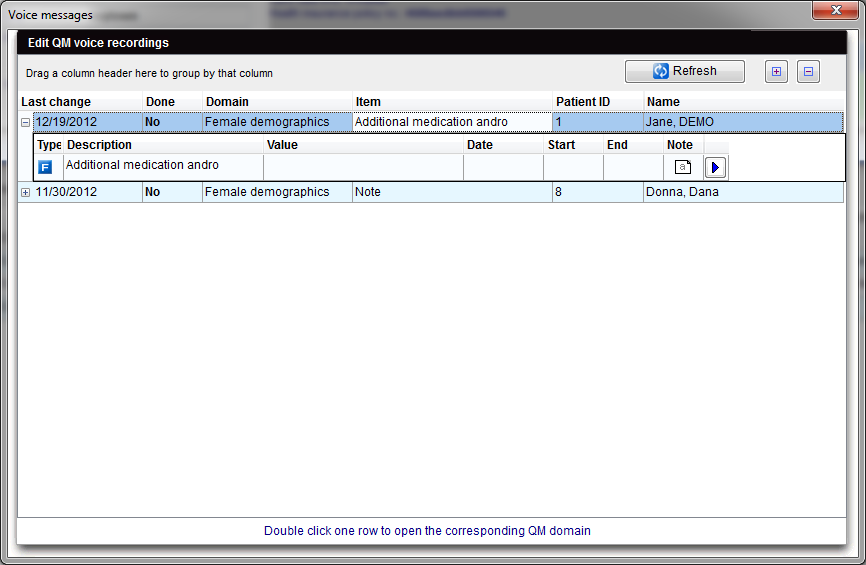
The Voice messages list is available through the top menu Reports -> Voice messages.
On this list, it is possible to listen to messages left in all QM fields for all patients.
  |
| <img src="/images/hint48.png" alt="" width="48" height="48" /> | Double-click a record to jump to that patient's QM domain. |
| <a href="/index.php?title=MedITEX_IVF_manual">Back to the MedITEX IVF manual </a> | <a href="#top">Back to top</a> |